
Campervan USB Socket Not Charging? 8 Common Causes & Fixes
Is your campervan USB socket refusing to charge your phone? Perhaps its indicator light is on but nothing happens, your phone keeps connecting and disconnecting, or charging only works when the engine is running.
Before replacing the socket, it’s worth checking a few common electrical faults. The problem could be as simple as a damaged charging cable or as frustrating as voltage drop in the 12V wiring.
This guide explains eight possible causes, how to test your USB charging outlet with a multimeter and how to identify faults without unnecessarily replacing parts.
Find the Fault ↓ Wiring & Fuses Guide →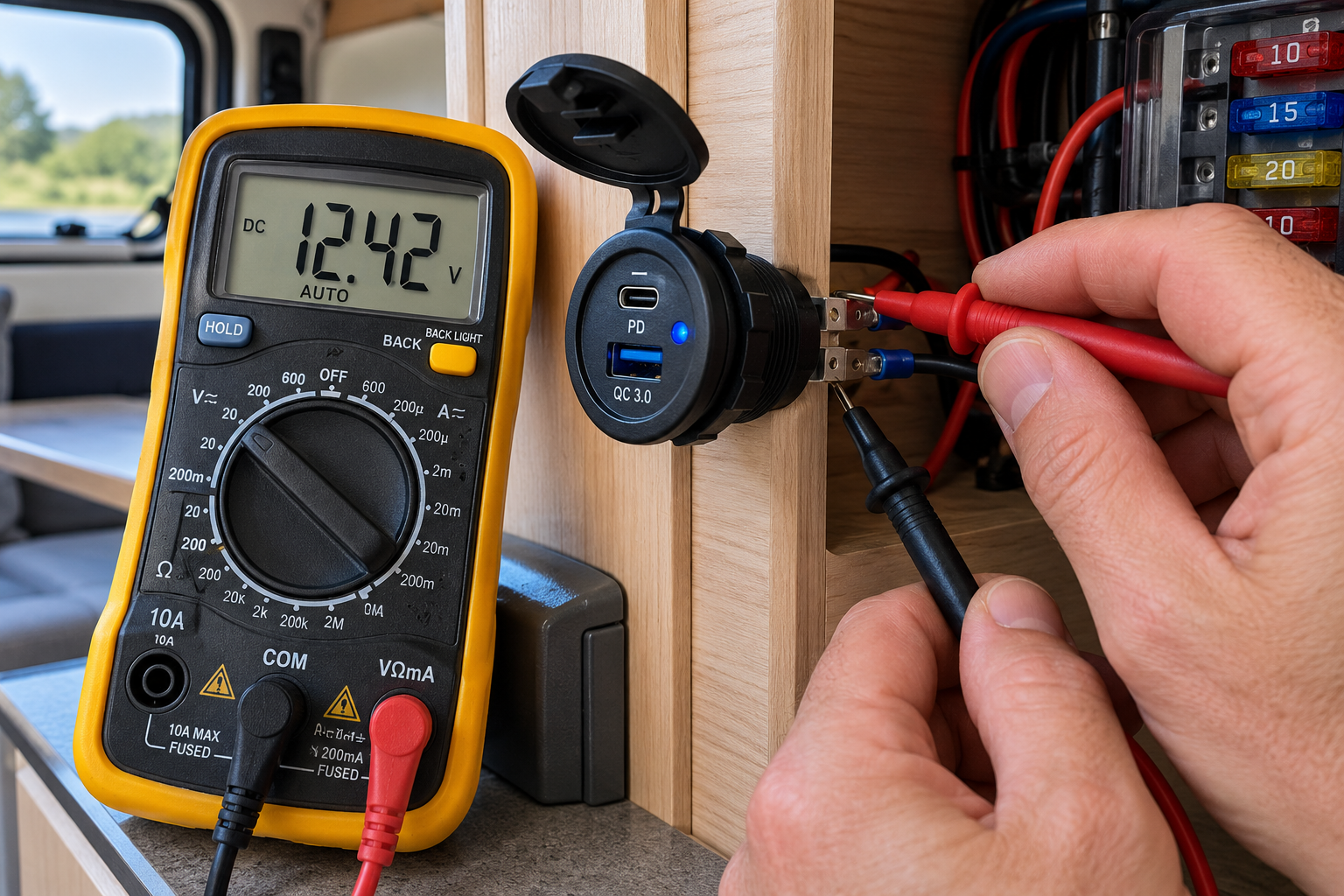
Quick Answer: Why Is My Campervan USB Socket Not Charging?
The first things to check are the USB charging cable, the socket’s 12V power supply, its negative connection and whether the USB outlet supports your device’s charging requirements.
Most campervan USB charging sockets contain a small electronic converter that takes the vehicle’s nominal 12V DC supply and produces a regulated USB output.
If the converter fails, the socket may stop charging even when its 12V supply is healthy.
Equally, a working USB converter cannot operate correctly if the supply voltage drops too far when a device starts drawing charging current.
Campervan USB Socket Fault-Finding Table
Different symptoms can point towards different faults. Use this table to decide which checks to carry out first.
| Symptom | Possible Cause | First Check |
|---|---|---|
| USB socket completely dead | Blown fuse, missing supply, loose wiring or failed converter | Check the fuse and 12V input voltage |
| Socket light on but phone won’t charge | Damaged cable, unsuitable output or faulty USB converter | Try a known-good cable and another device |
| Phone keeps connecting and disconnecting | Voltage drop, loose connection or converter overload | Measure input voltage while charging |
| Charges only when engine is running | Ignition-controlled circuit, low battery voltage or voltage drop | Identify the supply circuit and compare voltages |
| Charging is very slow | Low-power USB outlet, unsuitable cable or unsupported fast-charging protocol | Check the USB output specifications |
| Socket gets unusually hot | High-resistance connection, overload or internal failure | Stop using the circuit and inspect safely |
| Intermittent charging | Loose terminal, damaged connector, cable fault or failing converter | Check the cable, then inspect isolated wiring |
8 Reasons Your Campervan USB Socket Isn’t Charging
1 Damaged or Unsuitable USB Charging Cable
Before investigating the campervan wiring, rule out the charging cable.
USB cables can develop broken conductors, damaged connectors or intermittent internal connections. Some cables also lack the capability required for particular charging modes.
A damaged cable may charge slowly, work only when held at a certain angle or stop charging altogether.
How to check:
- Try another charging cable known to work.
- Try charging a different compatible device.
- Inspect the USB plug for damage or contamination.
- Check the original cable with another suitable charger.
If changing the cable solves the problem, there may be nothing wrong with the campervan socket.
2 Blown Fuse or Missing 12V Supply
Most aftermarket campervan USB sockets receive power from a fused 12V circuit.
If the fuse has blown or the supply circuit has lost power, the USB converter cannot operate.
Depending on the installation, the socket may be supplied from the leisure battery fuse box or an ignition-controlled vehicle circuit.
How to check:
- Identify the fuse protecting the USB socket.
- Check the fuse using an appropriate test method.
- Confirm whether the circuit should work with the ignition off.
- Check for suitable voltage at the socket input terminals if safely accessible.
If the fuse blows repeatedly, investigate the underlying fault rather than continually replacing it.
Read our Campervan Fuse Box Guide for more information about protecting 12V circuits.
3 Poor Earth or Negative Connection
A poor negative connection is a common source of faults in vehicle electrical systems.
Loose terminals, corrosion or damaged wiring can introduce unwanted resistance into the circuit’s return path.
The USB socket may appear to have power when nothing is connected, but its voltage can fall once charging current begins to flow.
How to check:
- Safely isolate the circuit before inspecting connections.
- Look for corrosion, loose terminals and damaged cable strands.
- Check the negative return path using an appropriate loaded voltage-drop test.
- Repair damaged connections with suitable automotive electrical components.
A connection can look perfectly clean while still having excessive resistance.
4 Voltage Drop in the 12V Wiring
Voltage drop occurs when electrical current flows through resistance in a cable, connector, switch or terminal.
Every cable has some resistance, but excessive resistance can prevent a USB converter from receiving enough voltage under load.
This can be particularly noticeable with long cable runs, undersized wiring or poor connections.
Common symptoms:
- The phone repeatedly connects and disconnects.
- Charging stops when another appliance switches on.
- The socket works with the engine running but not when parked.
- Input voltage falls noticeably when a device begins charging.
The most useful check is often a voltage measurement taken while the circuit is loaded.
You can explore suitable cable sizing with our Campervan Cable Size Calculator .
5 Faulty USB Voltage Converter
A campervan USB charging socket is more than a simple electrical connector.
Most contain a DC-DC converter that takes the nominal 12V vehicle supply and produces the regulated output required by USB devices.
If this converter fails, the socket may stop charging even when the incoming supply is healthy.
An illuminated indicator light does not necessarily mean the converter is working.
How to check:
- Confirm the socket receives suitable input voltage under load.
- Test with a known-good cable and compatible device.
- Check the manufacturer’s troubleshooting guidance.
- If the supply is sound but the socket still fails, replacement may be appropriate.
Sealed USB charging outlets are generally more practical to replace than repair internally.
6 USB Socket Cannot Supply Enough Charging Power
Not all USB charging sockets provide the same output power.
An older low-output USB socket may charge a small device but struggle with a modern smartphone, especially when navigation or other power-hungry apps are running.
USB-C Power Delivery requires compatible equipment and successful charging negotiation.
A USB-C connector alone does not guarantee high-power charging.
How to check:
- Check the outlet’s rated output power.
- Confirm which charging protocols it supports.
- Use a suitable charging cable.
- Try charging with the phone screen switched off.
If the outlet works but charging is consistently too slow, a properly specified replacement may be worth considering.
7 Low Leisure Battery Voltage or Battery Protection
Some USB converters stop operating when their input voltage falls below a specified threshold.
This may happen when the leisure battery is discharged or when a lithium battery’s management system interrupts the supply.
However, low voltage at the USB socket does not automatically mean the battery itself is flat.
A poor connection or undersized cable can produce similar symptoms.
How to check:
- Measure leisure battery voltage under the relevant conditions.
- Compare it with the USB socket input voltage.
- Check the battery monitor and charging system.
- Review any lithium battery BMS warnings.
If battery voltage is healthy but socket input voltage is much lower, investigate the wiring and connections.
Learn more in our Campervan Leisure Battery Guide .
8 Loose, Corroded or Overheated Connections
Campervans are exposed to vibration, temperature changes and condensation.
Over time, poorly secured terminals can become loose or intermittent.
High-resistance connections may also generate heat when current flows.
Warning signs include:
- Discoloured electrical terminals.
- Melted plastic around the socket.
- A burning smell.
- Intermittent operation during vehicle movement.
- Connections becoming unusually hot.
How to Test a Campervan USB Socket With a Multimeter
A multimeter can help determine whether the fault is inside the USB converter or elsewhere in the 12V electrical circuit.
The following procedure applies to a typical aftermarket USB outlet supplied by a nominal 12V DC circuit.
Check the Cable and Device
Test the USB outlet using a known-good cable and another compatible device.
If the socket works normally, the original cable or device may be responsible.
Identify the 12V Input Connections
Locate the socket’s positive and negative supply terminals using the manufacturer’s wiring information.
Do not rely on wire colours alone.
Measure the Input Voltage
With the circuit energised and the multimeter correctly set to DC volts, measure between the socket’s positive and negative supply terminals.
Compare the result with the socket’s specified operating voltage range.
Repeat the Test Under Load
Connect a compatible device that draws charging current and repeat the measurement.
A significant voltage drop when charging starts may indicate excessive resistance or another supply-related problem.
Compare With Leisure Battery Voltage
Measure battery voltage under the same operating conditions.
If voltage at the USB socket is significantly lower, investigate the wiring and connections between them.
Check Whether the USB Converter Has Failed
If the USB socket has a stable, suitable input voltage but will not charge a known-good compatible device, the converter becomes a likely suspect.
Confirm compatibility and follow the manufacturer’s instructions before replacement.
Why a USB Socket Can Show 12V But Still Not Charge
This is an important concept when diagnosing campervan electrical faults.
A digital multimeter draws very little current when measuring voltage.
Because of this, a circuit with a poor electrical connection may still display an apparently normal voltage when nothing is connected.
Once a phone starts charging, current flows through the circuit.
If a connection has excessive resistance, the voltage available to the USB converter can fall significantly.
Worked Example: A Poor Electrical Connection
Imagine a USB converter draws 2A from its 12V supply.
A damaged connection introduces an additional resistance of 1 ohm.
Current: 2A
Additional resistance: 1Ω
Voltage drop: 2A × 1Ω = 2V
Battery voltage: 12.6V
Approximate socket input: 10.6V
In this simplified example, the converter receives approximately 10.6V rather than 12.6V.
Whether it continues operating depends on its specified input range and protection behaviour.
The poor connection would also dissipate approximately 4W as heat, making it a potential safety concern.
How Should a 12V Campervan USB Socket Be Wired?
A typical aftermarket USB charging outlet is connected to a suitable 12V positive supply and a correctly installed negative return.
The positive supply circuit should be protected by an appropriately rated fuse.
The fuse must be selected to protect the wiring against electrical faults.
Its rating should be based on the cable, installation method and equipment requirements, rather than simply matching the USB socket’s advertised output power.
For more information, explore our Campervan Cables & Fuses Guide and Campervan Fuse Box Planner .
What Should You Look for in a Replacement Campervan USB Socket?
If testing confirms that the USB outlet has failed, choose a replacement suitable for your campervan’s electrical system and charging requirements.
Correct Input Voltage Range
Choose a unit rated for the actual operating voltage range of your electrical system, including normal charging conditions.
Suitable USB Output
Check output power and supported charging protocols. Modern devices may benefit from compatible USB-C Power Delivery.
Secure Electrical Connections
Look for terminals and mounting arrangements suitable for vibration in a moving vehicle.
Appropriate Environmental Protection
Consider moisture, mounting location, ventilation and manufacturer installation requirements.
Does a Higher-Wattage USB Socket Need Thicker Cable?
Potentially, yes.
A higher-output USB converter generally requires more input power.
For example, a converter delivering 30W at 85% efficiency would require approximately 35W of input power.
At a 12V input, that is roughly 2.9A.
Actual current depends on the equipment and operating conditions, so use manufacturer specifications when selecting cable and circuit protection.
Our Campervan Cable Size Calculator can help with preliminary cable sizing.
How to Prevent Future USB Charging Problems
- Use suitable charging cables. Avoid damaged or poorly fitting connectors.
- Secure electrical wiring. Prevent terminals and cables from vibrating loose.
- Protect the circuit correctly. Use suitable fuses and appropriately sized wiring.
- Keep connections dry. Choose suitable mounting locations and equipment.
- Avoid overloading. Check the outlet’s total power rating when charging multiple devices.
- Investigate overheating. Hot or discoloured terminals require attention.
- Monitor battery condition. Low supply voltage can affect charging performance.
Frequently Asked Questions
Why is my campervan USB socket not charging my phone?
Common causes include a damaged charging cable, missing 12V supply, blown fuse, poor negative connection, excessive voltage drop, incompatible charging output or failed internal converter.
Why does my USB socket light up but not charge?
An indicator light does not prove the USB converter is producing a suitable output. Check the cable, device compatibility and input voltage under load.
Why does my campervan USB socket work only when the engine is running?
The circuit may be ignition-controlled. Alternatively, the higher system voltage during engine operation may temporarily overcome a marginal supply problem. Identify the circuit and compare voltages under load.
Can a campervan USB socket drain the leisure battery?
Yes. Some USB converters consume a small amount of standby power even when no device is connected. Consumption varies by model. A switched outlet can reduce standby drain.
Why does my phone keep connecting and disconnecting from the USB charger?
Possible causes include an intermittent cable, loose connection, unstable input voltage, insufficient charging power or faulty converter.
Can I connect a USB socket directly to a leisure battery?
A compatible 12V USB outlet can be supplied from a leisure battery through a correctly designed and protected circuit. Suitable cable sizing, fuse protection and secure connections are essential.
What voltage should a campervan USB socket have?
Its 12V input should remain within the manufacturer’s specified operating range. The USB output voltage depends on the USB standard and any negotiated charging mode, so it is not always fixed at 5V.
Why is my campervan USB socket charging slowly?
The outlet may have a low power rating, lack the required fast-charging protocol or be connected through an unsuitable cable. Heavy phone use while charging can also slow the increase in battery percentage.
Should I replace a blown USB socket fuse with a bigger one?
No. Never increase a fuse rating simply to stop it blowing. An oversized fuse may fail to protect the wiring properly during an electrical fault.
Can I test a campervan USB socket without removing it?
Start with known-good charging cables and devices, and check accessible fuse and battery information. Further voltage testing may require safe access to the socket’s supply terminals.
Related CamperVoltHub Guides & Tools
Planning or Repairing Your Campervan Electrics?
CamperVoltHub provides practical electrical guides and free planning tools to help you understand your 12V system, choose suitable components and diagnose common faults.
Explore Free Electrical Tools →Final Thoughts
If your campervan USB socket isn’t charging, start with the simple checks before buying replacement parts.
A damaged cable or incompatible device can look exactly like a faulty socket.
Once those possibilities are ruled out, check the fuse, 12V supply and negative return.
One of the most important lessons in electrical fault finding is that a circuit can show a normal voltage with no load connected but fail as soon as current begins to flow.
Measuring the supply under load is often the key to finding the real problem.
A methodical approach can help narrow the fault down to the cable, device, converter, wiring or battery system without unnecessary replacement parts.
1 thought on “Campervan USB Socket Not Charging? 8 Common Causes & Fixes”